


Local councils in North London provide essential services to residents, including waste collection, council tax billing, housing, benefits, and planning applications. As councils across boroughs such as Barnet, Camden, Enfield, Haringey, Islington, and others move more of these services online, every resident and staff member now relies on a council‑related account. This shift dramatically increases the risk of cyber attacks, because hackers can target personal accounts, service portals, or employee logins to steal data, disrupt services, or commit fraud. Protecting your council account from cyber attacks therefore sits at the intersection of personal cybersecurity and public‑sector IT resilience in North London and beyond.
- What is a council account and why must it be protected?
- How do cyber attacks typically target council accounts in North London?
- What are the main types of cyber threats to council accounts?
- Why are strong passwords and multi‑factor authentication essential for North London residents?
- How can North London residents recognise and avoid phishing aimed at council accounts?
- What technical steps should North London councils and users take to reduce risk?
- What should you do if you suspect your North London council account has been compromised?
- How can North London staff and citizens build long‑term cybersecurity habits?
Modern North London councils handle citizens’ names, addresses, bank details, benefits records, and sometimes health‑related information. A breach of these records can lead to identity theft, financial loss, and erosion of public trust. At the same time, hackers often use council accounts as stepping stones to broader attacks on local‑government networks. This means the steps you take to protect your own council profile—whether you are a resident in Hampstead, a contractor in Tottenham, or a staff member in a Camden‑based housing department—directly affect the wider community.
What is a council account and why must it be protected?
A council account is any online account tied to a local authority, such as a resident portal login, a council‑run tax or benefits portal, a contractor dashboard, or a staff email and file‑sharing account. In North London, virtually every local authority (Borough, City, or Council) now operates a resident‑services website where citizens can pay Council Tax, apply for housing, report issues, or access welfare‑related services. These accounts typically store personal identifiers, contact details, payment information, and service‑history records.
Council accounts are attractive targets because they combine several risk factors: they contain personally identifiable information (PII), often link to bank or card details, and may connect to broader government systems such as welfare or housing databases. Cybercriminals can use compromised council accounts to request fraudulent payments, apply for council housing under false identities, or alter billing details. In 2023, the UK’s National Cyber Security Centre (NCSC) reported that local‑government systems were repeatedly targeted through phishing and credential‑reuse attacks, with real‑world cases where council email accounts were hijacked to redirect supplier payments to criminal‑owned bank accounts. North London boroughs have also been advised to harden their online portals in response to these national‑level threats.
Protecting a council account is therefore not just about safeguarding a single set of login credentials. It is about preventing financial crime, maintaining the integrity of public records, and keeping essential services like waste collection, housing, and emergency‑housing support running without disruption in North London. A well‑protected council account reduces the likelihood that criminals can impersonate legitimate residents or staff and lowers the risk that local‑government networks become launching pads for wider cyber operations.
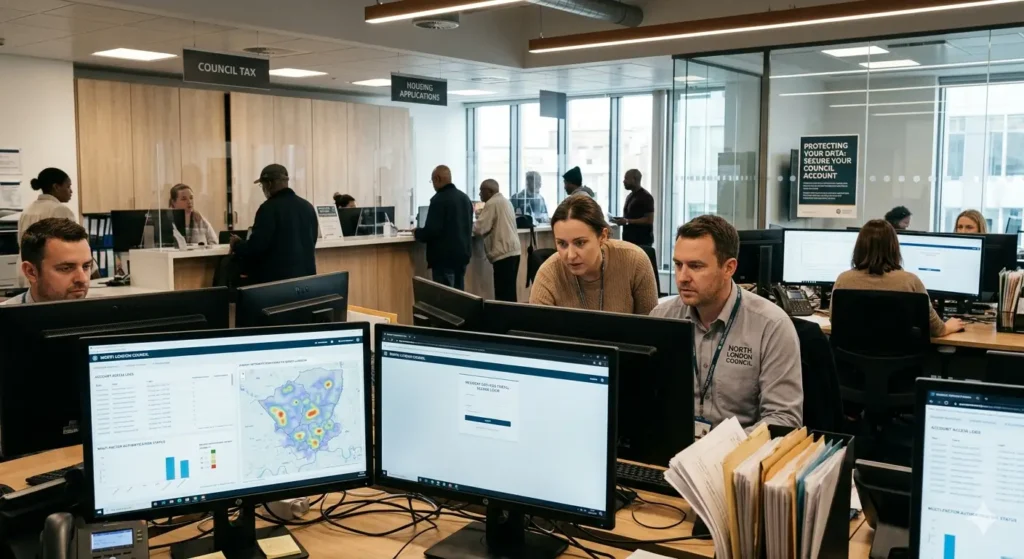
How do cyber attacks typically target council accounts in North London?
Cyber attacks on council accounts in North London usually rely on exploiting weak passwords, phishing, or third‑party software vulnerabilities. Attackers often begin with widely used techniques such as “credential stuffing”, where they try previously leaked usernames and passwords from other breaches against council portals. Automated bots can cycle through thousands or even millions of credential combinations in minutes, and if a North London resident uses the same password for online banking, social media, and the council’s portal, even a non‑council breach can indirectly compromise the council account.
Phishing emails and SMS messages are another common vector. Fraudsters may impersonate a North London borough brand, such as “Barnet Council Tax Online” or “Islington Housing Services”, using fake tax‑reminder emails or “urgent payment” messages that direct users to counterfeit login pages. When a user enters their credentials on these fake sites, the attacker immediately captures the username and password and can then log into the real council portal or associated banking systems. In several documented cases, local‑government employees in North London boroughs have clicked malicious links that installed ransomware or keyloggers, allowing attackers to harvest multiple staff credentials and pivot to higher‑privilege systems.
Other attack methods include exploiting outdated software, misconfigured web portals, and weak or missing multi‑factor authentication (MFA). If a North London council portal does not enforce HTTPS encryption, does not patch known vulnerabilities in its web‑application framework, or allows default passwords, attackers can often gain direct access or escalate low‑privilege accounts to administrative roles. For example, guidance for UK local authorities highlights that many councils still rely on legacy systems with infrequent patching cycles, giving attackers several windows of opportunity to exploit public‑known vulnerabilities.
What are the main types of cyber threats to council accounts?
Several distinct cyber‑threat categories threaten council accounts, including those used against North London boroughs. First, credential‑theft attacks (phishing, keyloggers, and credential stuffing) focus on stealing login credentials. Second, malware‑based attacks (ransomware, trojans, and spyware) aim to install malicious software on user devices or council servers. Third, denial‑of‑service (DoS) or distributed‑denial‑of‑service (DDoS) attacks overwhelm council‑run websites or portals, blocking legitimate users from logging in or submitting forms.
Within credential‑theft, phishing and spear‑phishing are the most prevalent. A phishing email pretending to be from “Enfield Council Tax Online” may ask a North London resident to “verify their account” by clicking a link that leads to a fake login page. Spear‑phishing targets specific individuals, such as finance officers in Haringey or Islington, using carefully researched personal details to increase the email’s credibility. In 2023, the NCSC highlighted that local‑government staff are frequently targeted in business‑email‑compromise (BEC) schemes that attempt to trick them into changing payment details or releasing sensitive citizen data in London‑area boroughs.
Malware‑based threats include ransomware that encrypts council‑managed servers or resident‑facing portals, demanding payment to restore access. In recent years, multiple UK local authorities have reported ransomware incidents that temporarily took down complaint‑handling systems, payment gateways, and even some housing‑management tools. These incidents not only disrupt services in North London but also force councils to invest in incident‑response teams, data‑recovery, and sometimes insurance payouts.
Why are strong passwords and multi‑factor authentication essential for North London residents?
Strong passwords are the first line of defence for any council account in North London, because many attacks begin by guessing or spraying weak credentials. A strong password should be at least 12 characters long and combine uppercase letters, lowercase letters, numbers, and symbols in a non‑predictable pattern. For example, “HaringeyWaste2026!” or “IslingtonTax@N16” are significantly harder to guess than “password123” or “Council2023”. Passwords should never reuse personal information such as names, birth years, or street names, as these are easy for attackers to obtain from social media or data leaks.
Even strong passwords are vulnerable if they are reused across multiple services. If a North London resident applies the same password to their council portal, email, and an online shopping site, a breach at the least‑secure site can expose the council‑account credentials. Professional cybersecurity guidance therefore recommends using unique passwords for each important account and storing them in a reputable password manager. Password managers can generate and auto‑fill complex passwords, reducing the temptation to reuse or write them down.
Multi‑factor authentication (MFA), also known as two‑factor authentication (2FA), adds a second layer of verification beyond the password. Typical MFA methods include time‑based one‑time codes from an authenticator app (such as Google Authenticator or Microsoft Authenticator), SMS codes, or hardware‑based security keys. When a North London resident logs into a council portal, they must enter both the password and the current code from the app or device. Even if an attacker steals the password through phishing or a leak, they usually cannot access the account without the second factor.
Local‑government security frameworks increasingly treat MFA as mandatory in London‑area authorities. For example, UK guidance for local authorities recommends enabling MFA for all staff accounts with access to financial or citizen‑data systems. In practice, MFA can reduce the risk of successful account takeovers by over 99% compared with password‑only logins. Implementing MFA for resident‑facing portals in North London boroughs, where technically feasible, extends this protection to citizens and reduces the scope for fraud via stolen credentials.
How can North London residents recognise and avoid phishing aimed at council accounts?
Phishing emails and messages impersonate legitimate North London council services to trick users into revealing credentials, clicking malicious links, or downloading harmful attachments. A typical phishing email may spoof the logo of Barnet, Camden, Islington, or another borough, use a similar domain name such as “barnet‑tax‑online.com” instead of the official “.gov.uk” address, and create urgency with phrases like “your payment is overdue” or “urgent action required to avoid service disruption”. These messages often include a button or link that leads to a counterfeit login page, where entered credentials are immediately captured by the attacker.
To recognise phishing, North London residents should check several indicators. First, examine the sender’s email address carefully; many phishing emails use free email providers or domains that differ slightly from the borough’s official address. Second, look for spelling errors, inconsistent formatting, or generic greetings such as “Dear Customer” instead of the user’s actual name. Third, hover over any links without clicking to see the true destination URL; if the link points to a non‑council domain or a suspicious address, it is likely fraudulent.
Another red flag is urgent or threatening language designed to provoke an immediate response. Legitimate North London council communications rarely demand instant action under penalty of fines or service cuts in the same message. Instead, councils typically send reminders over several days and provide multiple contact options, such as phone numbers or web‑form links. If a message urges immediate payment or account verification, North London residents should independently verify it by visiting the council’s official website in a new browser tab or calling the council’s published phone number, rather than using contact details in the suspicious email.
Staff and residents should also avoid opening email attachments from unknown senders, especially files such as .exe, .zip, or .scr, which may contain malware. If a council email includes an unexpected attachment, recipients should confirm its legitimacy with the sender through a separate channel. North London boroughs often illustrate these principles in local cybersecurity training materials, such as phishing‑awareness campaigns that mimic council‑tax invoices or housing‑benefit notifications, to help residents internalise the warning signs.
What technical steps should North London councils and users take to reduce risk?
North London councils must implement robust technical controls to protect both staff and resident accounts. Key measures include enforcing multi‑factor authentication for all privileged accounts, applying the principle of least privilege (so users only have the minimum permissions necessary), and regularly patching operating systems, web servers, and application frameworks. UK guidance, such as the Cyber Essentials and NCSC advice, emphasises that patching known vulnerabilities within 14 days of release significantly reduces exploitable attack surfaces in London‑area authorities.
Network‑level protections such as firewalls, intrusion‑detection systems, and secure remote‑access solutions (for example, VPNs with strong encryption) help prevent unauthorised access to internal systems. North London councils should also log and monitor account‑login activity, so that unusual login times, locations, or repeated failed attempts can trigger alerts. Security‑information‑and‑event‑management (SIEM) tools can aggregate these logs and flag potential compromise, enabling rapid response.
For individual North London residents, technical‑hygiene steps include using updated operating systems and browsers, installing reputable antivirus software, and avoiding public Wi‑Fi when accessing sensitive accounts. If a citizen must use public Wi‑Fi in Hampstead, Islington, or Tottenham, they should connect through a trusted virtual private network (VPN) service to encrypt their traffic. Users should also clear their browser cache and cookies regularly and avoid saving passwords directly in the browser, preferring a dedicated password manager instead.
North London councils can further reduce risk by regularly reviewing account‑permissions and deleting inactive accounts. Service‑account best practices recommend keeping an inventory of non‑human accounts, rotating their credentials, and restricting their network access to only what is strictly necessary. These practices minimise the impact if a single account is compromised and help maintain overall system integrity in the boroughs.
What should you do if you suspect your North London council account has been compromised?
If a North London resident suspects unauthorised activity on their council account—such as unexpected password‑change emails, unfamiliar login locations, or transactions they did not authorise—they should act immediately. The first step is to change the account password using a different, secure device or browser, and to enable multi‑factor authentication if it is not already active. Users should then log out of all active sessions from the account’s security settings, which most modern portals used by North London boroughs support.
Next, the user must contact the council’s official support channel, such as the helpdesk number or online‑support form listed on the genuine council website (for example, the Barnet, Camden, Enfield, or Haringey council site). The support team can lock the account, investigate suspicious activity, and help restore legitimate access. In some cases, North London residents may also need to report financial‑fraud aspects to their bank or payment‑provider, especially if stolen credentials were used to redirect direct debits or initiate fraudulent payments.
North London councils should have formal incident‑response plans that outline how to handle suspected breaches, including procedures for isolating affected systems, notifying affected citizens, and complying with legal and regulatory requirements. Under UK data‑protection rules, certain types of breach must be reported to the Information Commissioner’s Office (ICO) and, in some cases, to affected individuals. Transparent communication from North London boroughs helps maintain public trust and supports residents in taking appropriate remedial steps.

How can North London staff and citizens build long‑term cybersecurity habits?
Protecting council accounts in North London is not a one‑off task but an ongoing practice that requires consistent habits. Staff and residents should receive regular cybersecurity awareness training that covers phishing, password hygiene, safe browsing, and the importance of reporting suspicious activity. UK‑based local‑government guidance recommends at least annual refresher training for employees, with targeted sessions for high‑risk roles such as finance, IT, and housing officers in North London boroughs.
On a personal level, North London individuals can adopt simple routines such as reviewing account‑login history, updating passwords periodically, and avoiding reusing the same credentials across services. Using a password manager and enabling multi‑factor authentication on all important accounts—email, banking, and council portals—creates a baseline of protection that applies broadly across boroughs like Barnet, Camden, Islington, and Enfield. Residents should also verify that they are using official council websites (recognisable by their .gov.uk domain) and avoid following links from unsolicited messages.
For North London councils, long‑term resilience comes from integrating cybersecurity into everyday operations: regular audits, security‑testing, and collaboration with external cybersecurity providers or national‑level agencies such as the NCSC. By embedding these practices at both organisational and individual levels, North London boroughs and their citizens can significantly reduce the risk of cyber attacks against council accounts and maintain the reliability of essential public services.
How can you protect your council account from cyber attacks?
Use a strong, unique password, enable two-factor authentication, avoid clicking suspicious emails or links, and keep your device and browser up to date.